

Flight Computer
Wind triangle to magnetic heading, density altitude, crosswind, weight & balance, steep turns and time — offline, with the working shown.从风三角一路算到磁航向,还有密度高度、侧风分量、载重平衡、坡度转弯与时间工具 —— 完全离线,并且给出计算过程。
Overview概述
A flight computer for the ninety seconds before you start the engine, and for the planning that follows. True course, TAS and winds aloft give you wind correction angle, true heading, groundspeed, time en route and fuel; add variation and deviation and the same chain continues to magnetic and compass heading. Field elevation, altimeter setting and temperature give you pressure altitude and density altitude. Runway and wind give you the crosswind and headwind components. Weight and balance keeps your own aircraft profiles, with arms and CG limits, on the device. Run the wind triangle backwards and you get the airspeed and heading needed to make a ground speed, or the wind you actually flew through. Climb and descent, unit conversions, steep turns and a Zulu clock round it out. Every result expands into the formula and the numbers that went into it — the way you would work it on a manual E6B.面向“开车之前那九十秒”以及随后计划工作的飞行计算器。真航线角、真空速与高空风 → 偏流角、真航向、地速、航段时间与需油量;再填上磁差与偏差,同一条链一直算到磁航向与罗盘航向。场高、高度表拨正值与气温 → 气压高度与密度高度;跑道号与风 → 侧风与逆风分量;载重平衡把你的机型资料(力臂与重心限制)存在本机。把风三角反过来解,可以得到飞出指定地速所需的空速与航向,或者你实际飞过的那一段里的风。此外还有爬升与下降、单位换算、坡度转弯与 Zulu 时钟。每一个结果都能展开成公式与实际代入的数值 —— 就像你在纸质 E6B 上一步步算出来的那样。
What it does功能
Wind triangle风三角
True course, true airspeed and winds aloft in: wind correction angle, true heading, groundspeed, time en route and fuel for the leg. The wind correction angle is given as left or right, the way it is flown, not as a negative number.输入真航线角、真空速与高空风,得到偏流角、真航向、地速、航段时间与这一段航路的需油量。偏流角按“左/右”给出,而不是一个带负号的数 —— 座舱里读的就是左右。
Density altitude密度高度
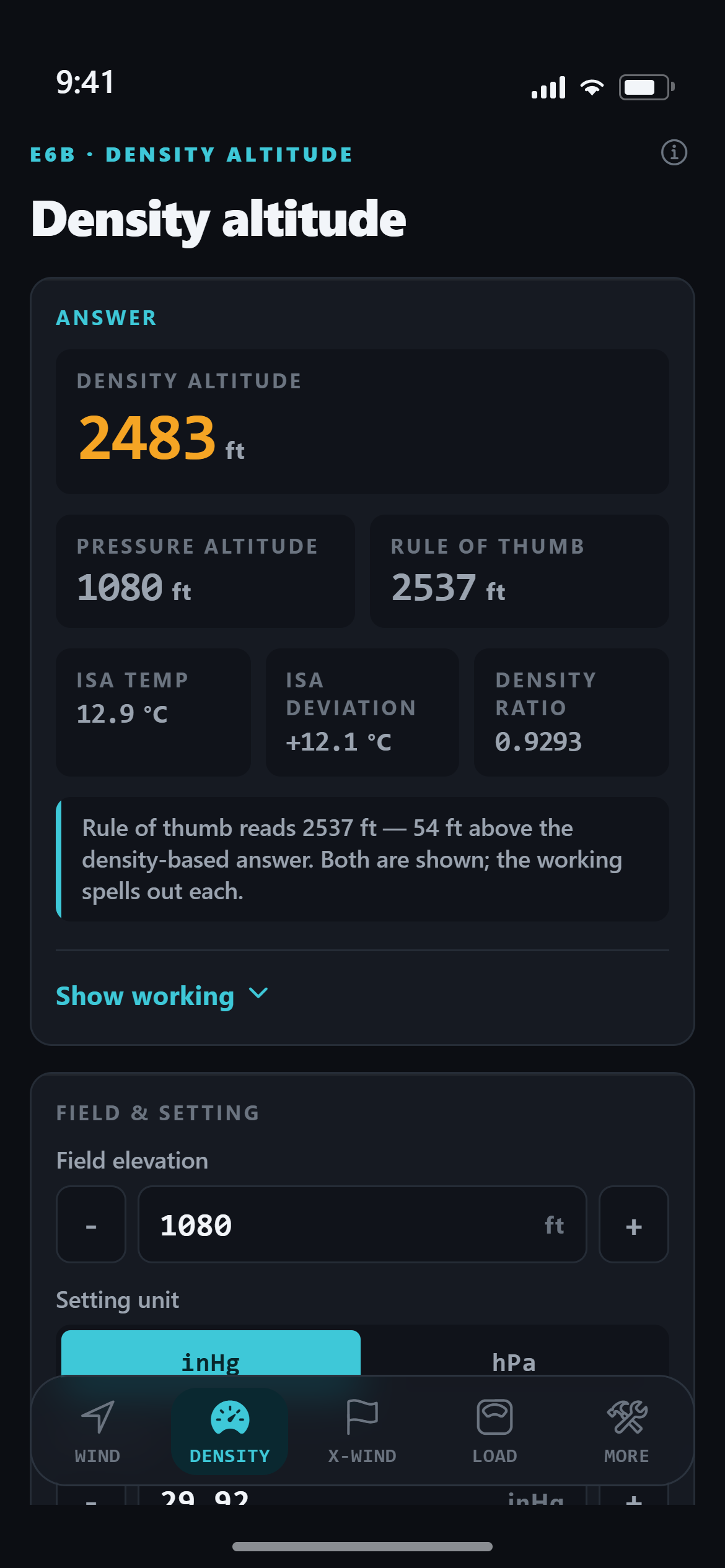
Field elevation, altimeter setting and outside air temperature give pressure altitude, density altitude, ISA temperature and the density ratio. Density altitude is computed from its definition — the altitude at which the standard atmosphere has this density — and the schoolroom “120 ft per degree” rule is shown alongside it, with the difference stated rather than hidden.输入场高、高度表拨正值与外界气温,得到气压高度、密度高度、ISA 温度与密度比。密度高度按定义计算 —— 标准大气中密度与当地相同的那一层 —— 同时并列显示“每度 120 英尺”的课堂规则式,并把两者的差直接写出来,而不是藏掉一个。
Crosswind and headwind侧风与逆风分量
Runway number plus wind direction and speed give the crosswind component, the headwind or tailwind component, and the angle off the nose — with a runway diagram showing how the wind vector splits. Enter your own crosswind limit and the app says whether this wind is inside it.跑道号加上风向风速,得到侧风分量、逆风(或顺风)分量和相对机头夹角,并有一张跑道矢量分解图说明风是怎么拆开的。填上你自己的侧风限制,App 会告诉你这股风在不在限制之内。
Weight and balance载重平衡
Your own stations, arms and limits: empty weight, fuel, seats, baggage — whatever your POH lists. You get total weight, total moment, centre of gravity and a chart showing how much envelope is left, not just an in-or-out verdict. Profiles are saved on the device under names you choose. The app ships no aircraft data, so nothing here is another aeroplane's numbers pretending to be yours.你自己的站位、力臂与限制:空重、燃油、座位、行李 —— 照你 POH 上列的那些填。得到总重、总力矩、重心,以及一张显示还剩多少余量的图,而不只是“在限内/超限”四个字。机型资料按你起的名字存在本机。App 不内置任何机型数据,所以这里不会拿别的飞机的数字冒充你的。
True airspeed and Mach真空速与马赫数
Calibrated airspeed, pressure altitude and temperature give true airspeed by the density ratio, the “plus 2% per 1,000 ft” rule alongside it, the local speed of sound and the Mach number.输入校正空速、气压高度与气温,按密度比得到真空速,并列显示“每 1000 英尺加 2%”的规则式结果,以及当地音速与马赫数。
Unit conversions单位换算
Knots, mph, km/h and m/s; nautical miles, statute miles and kilometres; Celsius and Fahrenheit; inHg and hPa. Also length, mass, volume, fuel weight (avgas and Jet A) and climb gradient between percent, degrees and feet per nautical mile. These use definition values, not approximations, so the app does not hedge them with “approximately”.节、mph、km/h、m/s;海里、法定英里、公里;摄氏与华氏;inHg 与 hPa。另有长度、质量、体积、燃油重量(Avgas 与 Jet A),以及爬升梯度在百分比、角度与英尺/海里之间的换算。用的是定义值而不是近似值,所以 App 不会在这些数前面加“约”字。
Show the working计算过程可展开
Under every result is the formula and the numbers that were substituted into it, step by step and unrounded. A student can check it by hand; an instructor can see exactly which convention the app used. This is the part most flight computers leave out.每个结果下面就是公式和代入其中的数值,一步一步、未经四舍五入。学员可以手算复核,教员能看清 App 用的是哪一种口径。这一块正是绝大多数飞行计算器省掉的部分。
Magnetic and compass heading磁航向与罗盘航向
The wind triangle gives you a true heading. To fly it you still need magnetic and compass heading: add your local variation and your aircraft's deviation, east or west. The app uses the handbook's convention, east is least and west is best, and shows both steps. Leave variation blank and magnetic heading is simply not shown, rather than assumed to be zero.风三角算出来的是真航向。要真的飞,还需要磁航向与罗盘航向:按东或西加上当地的磁差与本机的偏差。App 用的是手册的口径 —— 东减西加 —— 并把两步都列出来。磁差留空时,磁航向整条不显示,而不是替你假定它是 0。
Climb and descent爬升与下降
Enter the altitude to lose or gain, the distance you have and the ground speed you will fly: you get the gradient in percent and degrees, the rate of climb or descent it needs, and the time. Enter the gradient you plan to fly and it gives you the top of descent. This is arithmetic on your own numbers, with no climb tables behind it.输入要爬升或下降的高度、可用距离与将要飞的地速,得到以百分比和角度表示的梯度、所需的升降率以及耗时。填入你计划飞的梯度,它会给出下降点(TOD)。这是在你自己的数字上做算术,背后没有任何性能表。
Required airspeed and heading反解所需真空速与真航向
The wind triangle run backwards. Give the course, the wind and the ground speed you need to make good, and you get the true airspeed and heading that will produce it, plus magnetic and compass heading if you enter your variation and deviation. If the tailwind is stronger than the ground speed you asked for, the app says there is no answer instead of printing a negative airspeed.把风三角反过来解。给出航线、风和你必须飞出的地速,得到能飞出这个结果的真空速与真航向;填了磁差与偏差还会一并给出磁航向与罗盘航向。如果顺风比你要求的地速还大,App 会直接说“无解”,而不是印一个负的空速。
Wind from a flown leg由飞过的航段反求风
Fill in what you actually flew: the heading and true airspeed you held, and the track and ground speed you ended up with. The wind falls out of the difference. Useful when the forecast wind turns out to be wrong and you want to know what it really was.填上你实际飞出来的:保持的真航向与真空速,以及最终飞出的航迹与地速。风就是这个差值。当预报的风与实际不符、你想知道真实的风是多少时,这一块最有用。
Steep turns坡度转弯
Bank angle in: load factor, the sideways part of your lift, how much your stall speed rises, and your stall speed in the turn once you add the 1 G figure from your POH. There is a load-factor curve, not just numbers, and the shape is the point: it is nearly flat until 45 degrees and then climbs steeply. Turn rate and turn radius are deliberately absent, because the handbook describes them in words and prints no formula to check an answer against.输入坡度,得到载荷因数、升力的水平分量、失速速度上升的幅度,以及填入 POH 上 1G 失速速度之后的转弯失速速度。除了数字还有一条载荷因数曲线 —— 曲线的形状才是重点:45° 以前几乎是平的,过了 45° 陡然立起来。转弯率与转弯半径是刻意不做的,因为手册对这两个量只有文字描述,没有印出任何可以用来核对的公式。
Time, Zulu and a stopwatch时间、Zulu 与秒表
Add or subtract an interval to a Zulu time and get the result, with a note when it lands on another day. The handbook's time zone table is included as a reference. There is a stopwatch and a countdown timer as well. No time zone database is bundled: the app cannot know where you are, and does not pretend to.对 Zulu 时刻加减一个时间间隔得到结果,跨天时会有一句提示。手册上的时区表作为参考一并列出。此外还有秒表与倒计时。App 不内置时区数据库 —— 它无法知道你身处哪个时区,也不假装知道。
Everything on one screen全部收在一屏清单里
The fifth tab, More, is a one-screen list rather than a long scroll: eight calculators at the top, then the reference pages (the formula-by-formula sources, the worked examples you can check yourself, and what the app deliberately does not do), then appearance and help. Tapping any row opens that one item full screen, with a back button and its own answer panel.第五个页签 More 是一屏清单,不是长滚动页:最上面八个计算器,接着是三页参考(逐条列出出处的公式表、可以自己核对的例题、以及 App 刻意不做的事),最后是外观设置与帮助。点任意一行进入该项的整屏页面,带返回键与它自己的答案面板。
Offline, no account, no ads离线、无账号、无广告
Everything runs on the device. There is no account to create, nothing you type is transmitted anywhere, and no result needs a network connection. It is a one-time purchase, with no subscription and no in-app purchases.全部在本机运行。不需要注册账号,你输入的任何内容都不会被传输,也没有任何一个结果需要联网。买断制,没有订阅,也没有 App 内购买项目。
What it does not do它不做什么
It holds no aircraft performance data, so it does not compute takeoff or landing distances, or the range and endurance of any particular type. Climb and descent is arithmetic on the altitude and distance you give it, with no performance tables behind it. It ships no weight-and-balance data either: arms, maximum weights and CG limits are yours to enter, and if you leave a limit blank the app says “not set” rather than assuming you are inside it. Turn rate and turn radius are not computed: the handbook describes both in words only and prints no formula, so there would be nothing to check an answer against. It does no navigation, weather, traffic or flight-plan filing — that is a different kind of app. And it is not approved by, endorsed by, or affiliated with the FAA, ICAO or any aircraft manufacturer. Verify every result against your POH/AFM and the current weather before you fly.App 不含任何机型性能数据,因此不计算任何具体机型的起飞/着陆距离、航程与续航。爬升与下降是在你给出的高度和距离上做算术,背后没有任何性能表。也不含任何机型载重平衡数据:力臂、最大重量与重心限制全部由你填写 —— 留空时 App 显示“未设置”,而不是替你假定“在限内”。转弯率与转弯半径不计算:手册对这两个量只有文字描述、没有印出任何公式,算出来也没有可核对的东西。它不做导航、气象、交通或飞行计划申报,那是另一类 App 的事。它未经 FAA、ICAO 或任何飞机制造商认可、背书,也与它们无关联。飞行前请以你的 POH/AFM 与当时的天气实况逐项核对。
Getting help获取帮助
Questions, bug reports and data corrections go to support@ai123.xyz, or see the Flight Computer support page. Data corrections take priority over feature work. 问题、缺陷反馈和数据更正请发到 support@ai123.xyz,也可见 Flight Computer 技术支持页。数据更正的优先级高于新功能。
Privacy隐私
No accounts, no analytics, no advertising. Read the full privacy policy. 没有账号、没有统计、没有广告。完整说明见隐私政策。